The Best Tablets for Kids in 2026: Expertly Tested and Rated Child-Friendly Picks
Discover the best tablets for kids in 2026. We've tested the iPad and Amazon Fire series for durability, parental controls, and battery life to help you pick the right one.
Finding the Ultimate Tech Companion for Your Child
Introducing a tablet to a child is often described as a high-stakes stress test for modern technology. For parents and guardians, the search isn't just about the fastest processor or the highest resolution screen; it is about finding a device that can withstand the chaos of childhood. From accidental three-story drops to mysterious sticky residues and the occasional emotional meltdown, a child's tablet needs to be more than a gadget—it needs to be a survivalist.
To qualify for our top recommendations, a tablet must possess the durability of a tank, the flexibility to evolve as the child grows, and a robust ecosystem of educational tools that make learning feel like play. Most importantly, the parental controls must be ironclad, giving guardians complete peace of mind over screen time and content access.
The Top Contenders for 2026
1. Apple iPad (11th Gen): The Gold Standard for Versatility
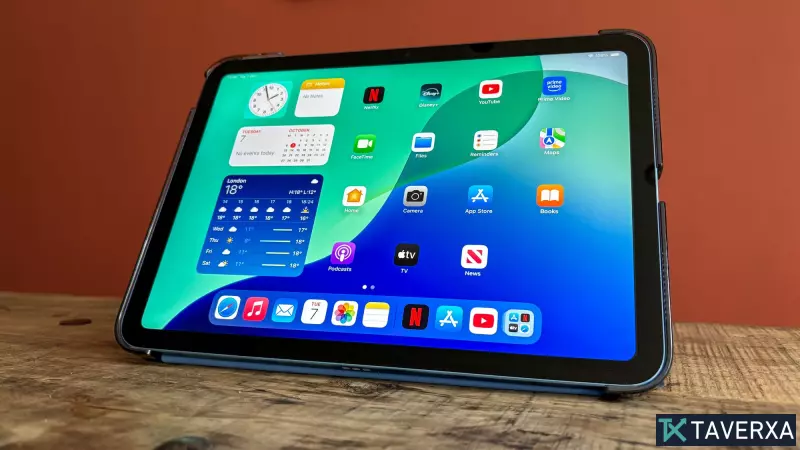
The 2025 iPad remains the heavyweight champion of the tablet world. While it isn't purpose-built for toddlers, its sheer power and a massive library of high-quality apps make it a lifelong investment. Powered by the A16 Bionic chip, it ensures a lag-free experience that prevents the dreaded "tech-tantrum."
- Pros: Blazing fast performance, a stunning 10.9-inch Liquid Retina display, and exceptional app support from giants like Lego and Crayola.
- Cons: High price point and a fragile glass-and-aluminum build that absolutely requires a rugged third-party case.
- Verdict: Best for parents who want one device that can grow from a drawing tablet into a school workstation.
2. Amazon Fire HD 10 Kids: The Ultimate Starter Kit
Designed specifically for the 3-to-7-year-old demographic, the Fire HD 10 Kids is built for "oops" moments. It comes pre-packaged with a chunky, shockproof cover and a limited 2-year warranty that acknowledges the reality of childhood accidents.
- Pros: Incredible durability, extensive parental controls, and an impressive 14.5-hour battery life for long car trips.
- Cons: Limited app selection compared to the Apple App Store and mediocre audio quality.
- Verdict: The safest and most cost-effective bet for early learners.
3. Amazon Fire HD 10 Kids Pro: The "Big Kid" Upgrade
As children transition into elementary school (ages 6-12), their needs shift. The Kids Pro edition offers a more mature aesthetic with a slimmer case while maintaining the safety guardrails parents rely on. It provides a smoother multitasking experience, allowing kids to jump between a word processor for homework and educational apps like Duolingo.
- Pros: Vibrant 1080p display, a refined OS for older children, and a tenacious battery that outlasts most competitors.
- Cons: Still lacks native Google apps, which can be a hurdle for certain school assignments.
- Verdict: The perfect bridge between a toy tablet and a full-scale laptop.
Buyer's Guide: How to Choose the Right Device
Choosing a tablet can be overwhelming. Consider these four critical factors before purchasing:
- Screen Size: For immersive gaming and videos, aim for a 10-inch screen. This provides the best visual experience without being too cumbersome for small hands.
- Battery Endurance: Look for tablets that offer at least 7 to 12 hours of life. This ensures the device won't die during a long-haul flight or a full school day.
- Budget: While high-end tablets exist, a good rule of thumb is to spend only what you are comfortable losing if the device is accidentally left behind at a park or sat upon.
- Age Appropriateness: Match the hardware to the developmental stage. Toddlers need shock-proof cases and restricted environments; pre-teens need productivity tools and higher performance.
Our Testing Methodology
Our ratings are based on rigorous real-world testing. We don't just look at the spec sheet; we put these devices in the hands of boisterous children to see how they handle actual use. We utilize light meters to verify screen brightness, conduct nonstop web-browsing loops to determine true battery life, and benchmark CPU speeds to ensure the user interface remains snappy under pressure. If a tablet can't survive a few weeks of real-world kid chaos, it doesn't make our list.