
The Best Printers of 2026: Expert Reviews of Top All-in-Ones, Inkjets, and Lasers
Discover the best printers of 2026. From budget inkjets and student-friendly tanks to professional photo and laser all-in-ones, we review the top picks to save you money on ink.
Finding the Perfect Printing Solution for 2026
Navigating the modern printer market can be a daunting task. From the sheer variety of technologies—inkjet, laser, and super-tank systems—to the hidden costs of ink subscriptions, choosing the wrong machine can lead to runaway expenses and frustrating technical glitches. To take the guesswork out of the process, we put dozens of machines to the test, printing over 500 pages to determine which models truly deliver on their promises of speed, quality, and affordability.
The Top 5 Printers for Every Need
1. The Best Overall: Brother INKvestment MFC-T780DW
For those seeking a balanced powerhouse for home or office use, the Brother INKvestment MFC-T780DW stands above the rest. Its primary appeal is the exceptionally low cost of ownership, with text pages costing as little as 0.3 cents. In our lab tests, it proved to be a speed demon, completing a five-page text document in just 24.2 seconds.
While its small LCD isn't a touchscreen and the document feeder is limited to 20 sheets, its performance in scanning and color graphics is impressive. It is a reliable workhorse that minimizes the 'ink anxiety' common with traditional cartridges.
2. The Best Budget Pick: Canon MegaTank Pixma G3290
If you need a reliable machine without a heavy upfront price tag, the Canon MegaTank Pixma G3290 is the ideal choice. This ink-tank all-in-one provides a high-quality output for documents and photos while keeping long-term costs low. We found its duplex printing speed—7.2 pages per minute—to be the fastest in its class.
It lacks some high-end features like a document feeder, but for casual users or those on a strict budget, it offers the best bang for your buck.
3. The Best for Students: HP Smart Tank 7602
Students need a combination of speed, ease of use, and low ink costs. The HP Smart Tank 7602 excels here, particularly in photo printing. It outperformed the category average by a wide margin, printing a high-resolution 8x10-inch photo in under two minutes.
Although the HP Smart software can be a bit finicky during setup and requires an account for full functionality, the machine's efficiency in churning out assignments and creative projects makes it a student staple.
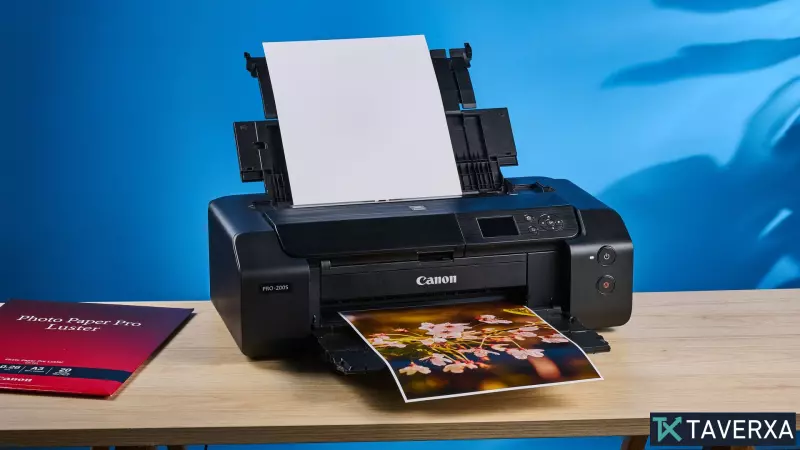
4. The Best for Professional Photos: Canon Pixma Pro-200S
For photographers and artists, the Canon Pixma Pro-200S is a game-changer. Utilizing an 8-ink dye system, this printer reproduces vibrant, true-to-life colors and maintains fine textures in skin and foliage that lesser machines often lose.
It supports wide-format printing up to A3+, allowing for stunning panoramic prints. While the ink costs are higher than a standard office printer, the gallery-worthy results justify the investment for those obsessed with photographic accuracy.
5. The Best High-End All-in-One: Canon Color imageCLASS MF753Cdw II
When your home office demands professional-grade laser performance, the Canon Color imageCLASS MF753Cdw II is the ultimate solution. This machine is a productivity beast, printing a five-page document in a blistering 11.31 seconds (roughly 26.5 ppm).
Featuring a responsive 5-inch touchscreen and a massive 250-sheet tray, it streamlines complex workflows. While the toner is more expensive and the unit is quite heavy, its durability and rapid-fire output make it a top-tier choice for small business owners.
Buyer's Guide: How to Choose Your Printer
To ensure you get the right machine, consider these three critical factors:
- Inkjet vs. Laser: Choose Inkjets for vivid colors, high-quality photos, and lower upfront costs. Opt for Lasers if you primarily print text, need professional sharpness, and want faster printing speeds.
- The 'Tank' Advantage: If you print frequently, look for 'MegaTank' or 'INKvestment' systems. These use refillable bottles instead of expensive cartridges, drastically lowering the cost per page.
- Multifunctionality: All-in-One printers save space by combining scanning, copying, and faxing. However, if you already use a smartphone app for scanning, you might save money by choosing a print-only model.
Our Rigorous Testing Process
We don't rely on manufacturer specs. Our team performs timed print tests using standardized documents and analyzes output quality against competitors. We calculate the actual cost per page by comparing the current street price of refills against the estimated page yield, ensuring our 'budget' recommendations are actually budget-friendly in the long run.


