The Best iPad Keyboards of 2026: Transforming Your Tablet into a Powerhouse
Discover the best iPad keyboards for 2026. From the premium Apple Magic Keyboard to rugged Zagg options and budget-friendly Logitech picks, we review the top choices.
Elevating Your iPad Experience
For many users, an iPad is a versatile piece of hardware that sits somewhere between a smartphone and a laptop. However, the true potential of Apple's tablets—whether you own the cutting-edge iPad Pro M5, the balanced iPad Air M4, or the reliable iPad 11—is only fully realized when paired with the right input method. The right keyboard doesn't just make typing easier; it transforms your device from a content-consumption slate into a full-blown productivity machine.
From high-end cantilever designs that mimic a MacBook to ruggedized protectors built for the field, the market in 2026 offers a diverse range of options. Based on extensive hands-on testing, we have curated the top picks to help you find the perfect match for your workflow and budget.
The Premium Standard: Apple iPad Magic Keyboard
When budget is no object and seamless integration is the priority, the Apple Magic Keyboard remains the undisputed champion. Its most striking feature is the "floating" cantilever design, which allows the iPad to hover above the deck, providing a customizable viewing angle that reduces neck strain.
Why it Wins: The typing experience is remarkably close to a MacBook Air, featuring tactile, responsive keys. Furthermore, the integrated multi-touch trackpad allows for fluid navigation through iPadOS gestures, making it a necessity for those using Stage Manager for multitasking.
Trade-offs: The primary hurdle is the cost. Additionally, it relies on the Apple Smart Connector, meaning it cannot be used as a standalone Bluetooth keyboard if detached from the case. It also adds a noticeable amount of weight to the overall package.
The Versatility King: Zagg Rugged Book
For those who take their tablets into unpredictable environments, the Zagg Rugged Book offers a level of security that Apple's sleek offerings cannot match. It is engineered to survive drops of up to 6.6 feet, making it the ideal companion for students, field researchers, or parents.
Key Features: Beyond durability, the Zagg Rugged Book excels in flexibility. Its magnetized hinge swivels, allowing the user to switch between four distinct modes: Case, Video, Book, and Keyboard mode. This versatility allows you to flip the screen to face a client during a presentation or prop it up for a movie without the keyboard in the way.
The Budget Powerhouse: Logitech Slim Folio
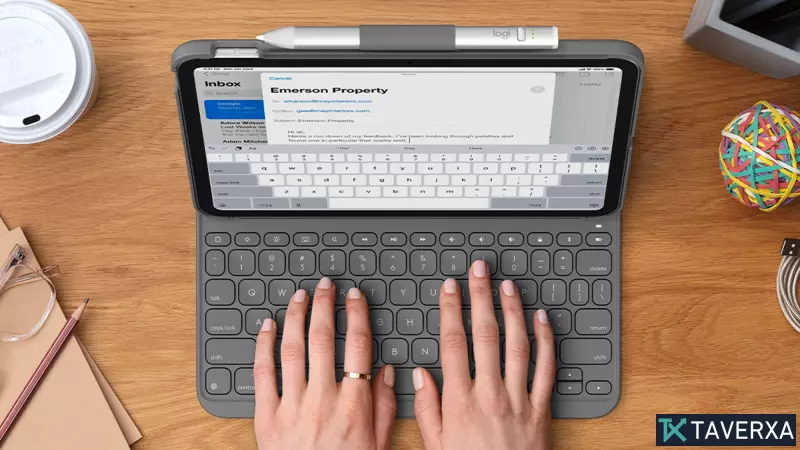
Not every user needs a trackpad or a floating screen. For those seeking a reliable typing surface without the premium price tag, the Logitech Slim Folio is the best value proposition available. Often priced under $100, it provides a lightweight, portable solution for basic productivity.
User Experience: Despite the lower price, the keyboard is highly efficient. It includes a dedicated row of shortcut keys for iPadOS, such as a Spotlight search key and home screen shortcuts, which significantly speed up navigation. It also features a built-in stylus holder, ensuring your Apple Pencil or Logitech Crayon is always within reach.
The Innovative Alternative: ESR Rebound & Typecase Touch
For users who want a middle ground between the Magic Keyboard and a budget case, brands like ESR and Typecase offer compelling alternatives. The ESR Rebound is particularly noteworthy for its rotating section, enabling both vertical and horizontal typing—a game-changer for those managing social media feeds or long vertical documents.
Similarly, the Typecase Touch offers a unique 360-degree swiveling design. While it uses more "plastic" feeling materials than Apple's premium finishes, it provides a practical, well-priced typing surface with multi-colored backlighting options for those who work in low-light environments.
Buying Guide: What to Consider in 2026
When shopping for an iPad keyboard, consider these three primary factors:
- Case vs. Stand-alone: Keyboard cases provide essential screen and body protection. Stand-alone Bluetooth keyboards offer more ergonomic freedom but require a separate way to prop up your tablet.
- Connectivity: Smart Connector keyboards (like Apple's) require no pairing and draw power directly from the iPad. Bluetooth keyboards require pairing and separate battery management (USB-C charging or coin cells).
- Input Needs: If you frequently edit spreadsheets or use complex apps, prioritize a model with a trackpad. If you primarily write emails or take notes, a simple keyboard deck will suffice.