
The Best 2-in-1 Laptops of 2026: Ultimate Hybrid Guides for Every User
Discover the best 2-in-1 laptops of 2026. From the dual-screen Asus Zenbook Duo to the gaming-ready ROG Flow Z13, we review the top hybrid laptops for every need.
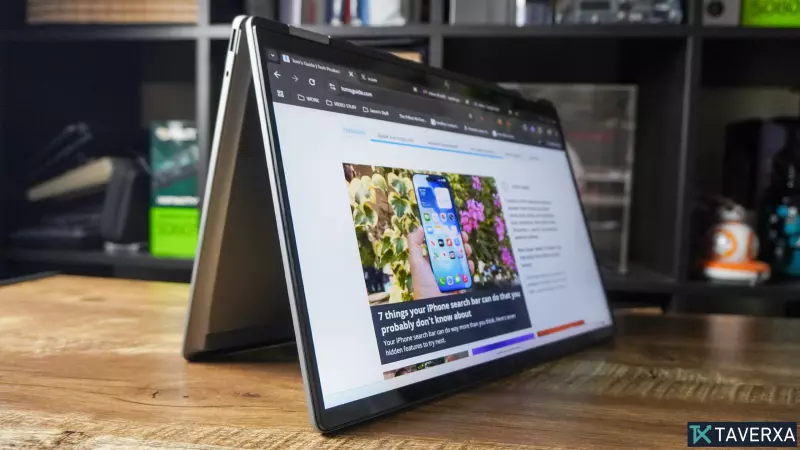
The Evolution of the Hybrid Laptop
The boundary between tablets and laptops has officially dissolved. In 2026, 2-in-1 laptops are no longer just compromises; they are high-performance machines that redefine versatility. From 360-degree hinges to groundbreaking dual-screen architectures, the latest generation of hybrids caters to everyone from corporate executives to digital artists and hardcore gamers.
The Gold Standard: Best Overall
Asus Zenbook Duo (2026)
The Asus Zenbook Duo has evolved into a productivity powerhouse, leading the market with its mesmerising dual 14-inch 3K OLED displays. By doubling the screen real estate, Asus has created a mobile workstation that replicates a multi-monitor setup on the go. Powered by the Intel Core Ultra X9 388H (Panther Lake), this machine solves the performance and efficiency gaps of previous generations, offering a significant boost in battery life (over 11 hours in dual-screen mode) and a refined, premium hinge design.
- Pros: Unmatched multitasking via dual OLED screens, stellar ergonomics, and a powerful new CPU.
- Cons: A premium price tag starting at $2,099 and a limited port selection.
The Budget Champion: Best Value
HP OmniBook X Flip 14
For those who need premium aesthetics without the four-figure price tag, the HP OmniBook X Flip 14 is the ideal choice. Featuring an all-metal chassis in meteor silver, it feels significantly more expensive than its actual cost. Driven by the Intel Core Ultra 5 226V, it handles daily office tasks, student workloads, and light editing with ease. While it comes with some factory bloatware, its value proposition—especially during sales where it can drop below $600—is unbeatable.
- Pros: Exceptional build quality, balanced mid-range performance, and high affordability.
- Cons: Pre-installed bloatware and a gapless keyboard that may require an adjustment period.
The Luxury Experience: Best Premium
Lenovo Yoga 9i Aura Edition
Lenovo continues to dominate the high-end convertible market. The Yoga 9i Aura Edition is a masterclass in form and function, featuring a CNC-milled aluminum body and a stunning 2.8K OLED touchscreen with a 120Hz refresh rate. The Intel Core Ultra 7 258V ensures that multitasking remains fluid, and the battery life is impressive, often exceeding 12 hours. It remains one of the best typing experiences available in a hybrid form factor.
- Pros: Visual excellence, top-tier keyboard ergonomics, and a sophisticated design.
- Cons: Expensive pricing and some unnecessary AI software gimmicks.
The Powerhouse: Best for Creators
Asus ProArt GoPro Edition (PX13)
Designed for the nomadic professional, the ProArt PX13 is built for 4K video editing, RAW photo processing, and 3D animation. It packs an AMD Ryzen AI Max+ 395 chip and a staggering 128GB of DDR5X RAM, allowing creators to run Premiere Pro and After Effects without lag. The 13-inch 3K OLED screen is color-calibrated for professional accuracy, though the 60Hz refresh rate is a minor drawback for some.
- Pros: Monstrous RAM and CPU power, high color accuracy, and extreme portability.
- Cons: Lacks a full-sized SD card slot (microSD only) and dim OLED brightness.
The Gaming Maverick: Best for Gamers
Asus ROG Flow Z13 (2025/2026)
The ROG Flow Z13 is the missing link between a handheld console and a gaming rig. Utilizing the AMD Ryzen AI Max 390/395 APU, it delivers frame rates comparable to an RTX 4070 in a tablet form factor. With a 2.5K Mini-LED display boasting a 180Hz refresh rate, it transforms gaming on the move. While ray tracing can be a struggle for the integrated graphics, the raw power for titles like Cyberpunk 2077 is genuinely impressive.
- Pros: Breakthrough integrated gaming performance, Mini-LED brilliance, and surprising battery life for a gamer.
- Cons: Limited port selection and high entry cost.
Buyer's Guide: How to Choose Your Hybrid
When selecting a 2-in-1, consider these four pillars:
- Performance: For basic browsing, a value machine like the OmniBook X is sufficient. For professional workloads, prioritize 32GB+ RAM and the latest Ryzen AI or Intel Core Ultra chips.
- Graphics: Most 2-in-1s use integrated graphics. If gaming is a priority, look specifically for the ROG Flow series or high-end AMD APUs.
- Portability vs. Utility: Detachable keyboards (like the Surface Pro 11) are better for tablet-first users, while 360-degree hinges (like the Yoga 9i) offer a better laptop-first experience.
- OS Architecture: Be aware of Arm-based chips (e.g., Snapdragon in Surface Pro 11), which offer incredible battery life but may have compatibility issues with some legacy x86 games and software.


