
I Swapped My Mac Mini for This Round Alternative — and Surprisingly, I Can Still Use All the Same Accessories
I swapped my Mac mini for the new round Lenovo Yoga Mini to see if a unique design could still handle my professional workflow. Here is why the puck-shaped PC is a keeper.
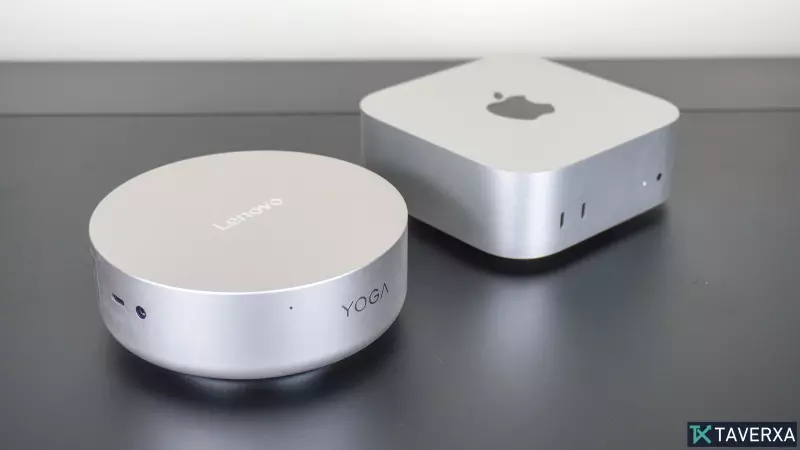
For years, the desktop mini PC market has been dominated by one standard shape: the square box. From the iconic Apple Mac mini to the countless Windows-based competitors, manufacturers have adhered to the familiar, space-saving rectangular design. However, a recent shift in hardware aesthetics and functionality has brought the Lenovo Yoga Mini into my workspace, and its unconventional circular chassis has completely changed my perspective on desktop computing.
The Shift to a Circular Design
At first glance, the Lenovo Yoga Mini looks more like a sleek smart speaker or a sophisticated thermostat than a powerhouse desktop computer. Unlike the sharp corners of the traditional Mac mini M4, the Yoga Mini’s puck-shaped design is built to be displayed. It lacks VESA mounting holes because Lenovo intends for it to sit proudly on your desk, utilizing its 360-degree ventilation system and, perhaps most notably, its customizable RGB underglow to make a statement.
Surprisingly Compatible
One of the biggest concerns when switching from a Mac to a Windows-based PC is the potential loss of specialized desk accessories. I rely heavily on docking stations to expand port availability. To my delight, because the Yoga Mini shares a remarkably similar footprint and dimensions with the latest Mac mini M4, my existing Satechi Mac Mini M4 Stand & Hub fits perfectly. The anodized aluminum finish of the hub complements the Yoga Mini so well that they appear to be a single, cohesive unit.
Features That Stand Out
Beyond its looks, the Yoga Mini packs innovative features that outpace traditional desktop designs:
- Presence Detection: Utilizing Intel’s Wi-Fi sensing, the machine automatically wakes your monitor when you approach and puts it to sleep when you leave, significantly reducing idle power consumption.
- Gesture Controls: The top chassis acts as a large touch-sensitive surface. While currently limited, you can program single and double taps to toggle lighting or launch specific applications.
- Fingerprint Security: The integrated scanner on the side of the unit provides a seamless, secure login experience, rivaling the convenience of mobile devices.
Performance and Flexibility
Powered by the Intel Panther Lake chip, the device handles productivity tasks with ease. While it won’t replace a high-end dedicated gaming rig, its integrated graphics performance—which I tested with titles like 'Session'—is more than capable of handling lighter gaming sessions. Furthermore, the power-efficiency of the unit allows it to be powered by a monitor with USB-C power delivery, eliminating the need for a bulky, proprietary power brick on the desk surface.
While the Mac mini remains a titan of the industry, the Yoga Mini proves that there is room for innovation in the mini PC space. Whether it is the customizable lighting or the clever use of touch interaction, Lenovo has created a piece of hardware that isn't just functional, but genuinely fun to use as the centerpiece of a modern desk setup.


