
HP OmniBook Ultra 14 Review: A Powerhouse ARM Laptop That Struggles With Its Price Tag
Is the HP OmniBook Ultra 14 the ultimate MacBook competitor? We tested its Snapdragon X2 Elite performance, OLED display, and battery life over one month.
Introduction: The Quest for the 'Ultra' Experience
When a laptop carries the 'Ultra' or 'Pro' moniker, expectations shift. It is no longer enough to simply have a functional screen and decent battery life. For a premium device, users demand a symphony of high-end materials, relentless performance, and a seamless user experience. The HP OmniBook Ultra 14 arrives with the promise of being a no-compromise machine, leveraging the cutting-edge Snapdragon X2 Elite chipset to challenge the dominance of the MacBook Air and Pro series.
After a month of rigorous testing, the results are a mixed bag of technical brilliance and practical frustrations. While it pushes the boundaries of what Windows on ARM can do, it also highlights the growing pains of a shifting hardware ecosystem.
Design and Build: Sophistication in Every Detail
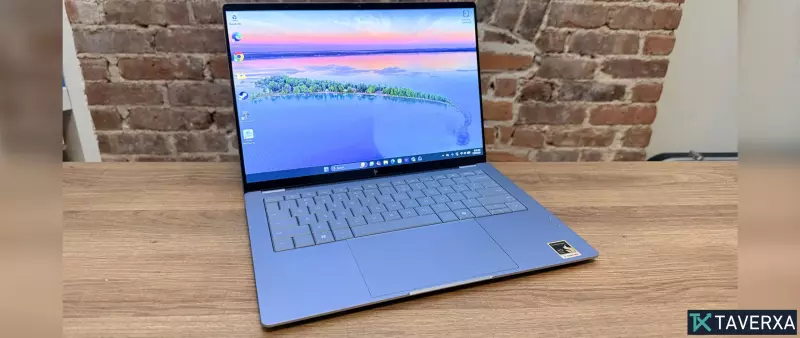
HP has leanly refined the OmniBook Ultra's chassis this year. The laptop features a sleek aluminum body available in Stone Blue and Eclipse Gray, accented by elegant chrome detailing along the sides and a debossed brushed chrome logo on the lid. These subtle touches elevate the device, making it feel polished and professional.
Portability is a major win here. With a Z-height of just 0.42 inches and a weight of 2.83 pounds, it is exceptionally easy to transport. Whether you are commuting to an office or working from a cramped airplane tray, the OmniBook Ultra 14 fits comfortably into almost any bag without adding significant bulk.
Performance: The Snapdragon X2 Elite Powerhouse
The heart of this machine is the Qualcomm Snapdragon X2 Elite CPU. In our testing, the multicore performance was genuinely impressive. The device handled heavy multitasking—such as running 15+ Chrome tabs alongside Spotify and video conferencing tools—without a hint of slowdown.
Benchmarking the Beast
In Geekbench 6 multicore tests, the OmniBook Ultra 14 outperformed several high-profile competitors, including the M5 MacBook Air and the Dell XPS 14. It even beat the MacBook Pro M5 in certain multicore tasks and Handbrake video encoding tests. While Apple still holds a slight lead in single-core performance, the gap has narrowed significantly.
Gaming on ARM: A Step Forward
Gaming has historically been the Achilles' heel of ARM-based Windows laptops. However, the Snapdragon X2 Elite shows real progress. We were able to run Baldur’s Gate III on Medium to High settings at 1080p with playable frame rates. Final Fantasy XIV was slightly more volatile, experiencing occasional frame drops, likely due to the Microsoft Prism emulation layer since the game lacks a native ARM client. Nevertheless, achieving over 60fps in these titles is a massive leap over previous generations.
Visuals and Audio: A Cinematic Experience
The display is undoubtedly one of the highlight features. The 14-inch OLED panel is vivid and bright, averaging 414 nits with HDR peaks reaching 847 nits. Covering 87% of the DCI-P3 color gamut, it is an excellent choice for streaming content and light creative work like photo editing.
Complementing the screen is a powerful quad-speaker array tuned by PolyStudio. The audio is rich and capable of filling a room, transforming the laptop into a legitimate entertainment hub for those who don't want to carry external speakers.
Battery Life: Respectable, but Outclassed
Snapdragon chips are renowned for efficiency, and the OmniBook Ultra delivers a solid 13 hours and 27 minutes in our web-surfing battery test. While this easily covers a full workday, it falls short of the industry's new gold standards. The M5 MacBook Air and Pro both outlasted the HP by a significant margin, and even some previous-generation Snapdragon devices showed better endurance.
The Downsides: Ports and Pricing
Despite its strengths, the OmniBook Ultra 14 suffers from two critical flaws: its port selection and its cost.
The Port Problem
For a device marketed as 'Ultra,' the connectivity is surprisingly sparse. With only three USB-C ports and a headphone jack, the laptop feels restrictive. The absence of an SD or microSD card reader is a particularly frustrating omission for power users and creators who frequently move large files from cameras, forcing them to rely on clunky external dongles.
The Price Paradox
The pricing strategy is where the OmniBook Ultra truly struggles. While the base model starts at $1,899, high-end configurations can soar to $3,599. At that price point, the value proposition vanishes. For the same amount (or less), a user could purchase a Razer Blade 16 with a dedicated RTX 5070Ti or a high-spec MacBook Pro, both of which offer superior raw graphics horsepower and better port arrays.
Final Verdict: A Mighty Competitor with a Costly Catch
The HP OmniBook Ultra 14 is a triumph of design and raw CPU performance. It successfully brings the efficiency and speed of ARM to a premium Windows chassis. However, the lack of diverse ports and the exorbitant pricing for top-tier specs make it hard to recommend over more established alternatives.
If you prioritize a stunning OLED screen, a lightweight build, and exceptional multicore speed—and you aren't bothered by using a dock—this is a formidable machine. But until HP aligns the price with the practical value, it remains a luxury item that doesn't quite reach 'Ultra' status in every category.


