I Used the SecondBrain Note AI for a Week and It Transformed My Workflow
I tested the SecondBrain Note AI for a week to see if it could improve my meeting productivity. Here is how it turned my workday around.
Rethinking the Meeting Experience
For many of us, the workday is a relentless series of meetings. While they are often essential for collaboration and sparking new ideas, they frequently leave us drowning in an endless sea of transcripts and unorganized action items. I recently spent a week testing a new device that promises to fix this: the SecondBrain Note from the creators of the Genspark AI workspace. After seven days of integrating it into my routine, I have found that my workdays are significantly more focused, organized, and productive.
What is the SecondBrain Note?
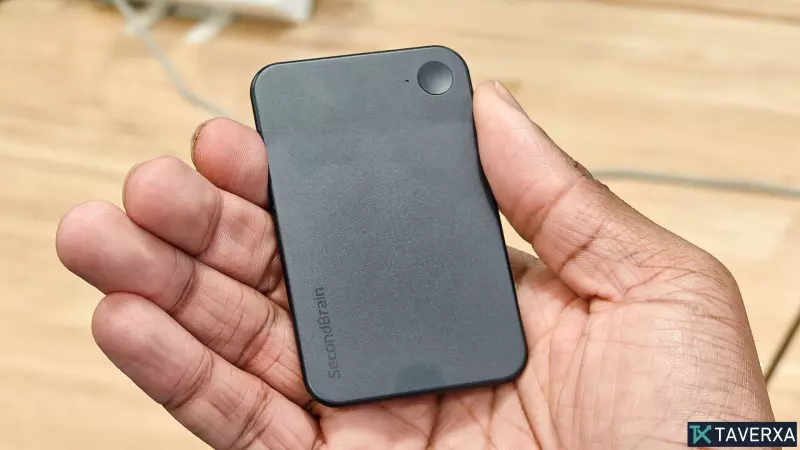
The SecondBrain Note is a compact, card-sized AI notetaker designed to magnetically attach to the back of your smartphone. It doubles as a convenient phone stand, making it easy to keep your device visible during video or in-person calls. A subtle RGB light acts as a privacy indicator, ensuring everyone in the room knows the device is recording. Beyond just capturing audio, the device features a dedicated physical button, allowing me to manually bookmark crucial moments during discussions for later review.
Integration with the Genspark Ecosystem
What truly separates the SecondBrain Note from generic AI recording apps is its deep integration with the Genspark AI workspace. Once a recording is completed, the data is synced to the app and fed directly into the SecondBrain memory system. This effectively transforms raw meeting transcripts into a searchable database of context, decisions, and tasks.
Instead of hunting through long-form transcripts to recall what was discussed, I could search the workspace for specific project names, colleague mentions, or action items. Everything was centralized, reducing the cognitive load required to manage follow-up tasks.
Structured Insights for Action
The app automatically organizes every meeting into three clean sections: Notes, Transcript, and Speakers. The 'Notes' section was my primary focus throughout the week. It provided a well-structured summary, complete with bullet points, speaker breakdowns, and clearly highlighted action items tailored to my specific role.
Because these notes become part of the 'SecondBrain' memory, I was able to use the Spark Agent to interact with my data. I could generate prompts such as:
- "Summarize last week's meetings into a weekly progress report."
- "What specific tasks did the project lead leave for me in our last call?"
- "Draft an email follow-up based on the decisions we made today."
Final Thoughts
After a full week of testing, the SecondBrain Note has earned a permanent place in my daily carry. With 35 hours of battery life and enough local storage for 7,000 hours of audio, it is a reliable tool for any professional looking to reclaim time lost in meetings. By bridging the gap between verbal conversation and actionable documentation, it has effectively allowed me to stop managing notes and start managing work.