Security Alert: Critical Vulnerabilities Found in AirDrop and Quick Share Affecting Billions of Devices
Security researchers uncover major flaws in Apple AirDrop and Android Quick Share, putting 5 billion devices at risk. Learn how the attacks work and how to protect your phone.
A Wake-Up Call for Wireless Connectivity
In a startling revelation from the cybersecurity community, researchers have uncovered significant security flaws in two of the world's most popular wireless file-sharing protocols: Apple's AirDrop and Android's Quick Share. The vulnerabilities, discovered by experts at the CISPA Helmholtz Center for Information Security, could potentially expose up to five billion active devices to targeted attacks.
The research indicates that hackers could exploit these holes from a distance of up to 30 meters (approximately 98.4 feet), turning a convenient feature into a potential gateway for disruption. While the two systems utilize different protocols, the researchers found a common architectural failure: the sacrifice of rigorous security for the sake of a seamless user experience.
Understanding the Technical Flaws
Both AirDrop and Quick Share operate as highly privileged background services. They are designed to 'wake up' and establish connections rapidly when a compatible device enters the vicinity. This design choice creates a window of opportunity for attackers.
The Apple AirDrop Exploit
On iOS and macOS, the vulnerability targets a background daemon that manages a suite of continuity features, including AirDrop, AirPlay, Handoff, Continuity Camera, and the universal clipboard. Researchers found that a single 'malformed request' sent to this service can cause the entire system to crash. If an attacker repeatedly sends these malicious requests, they can effectively lock down these essential features, holding the user's device functionality hostage.
The Android Quick Share Exploit
The vulnerability in Quick Share was identified during tests between a Samsung Galaxy S23 Ultra and the Quick Share Windows client. Researchers discovered 'logic bypasses' that allow an attacker to skip critical authentication steps. This enables a malicious actor to force a connection, maintain it, and feed the server attacker-supplied addresses, bypassing the intended security handshake.
Risk Assessment: What is at Stake?
The common thread between these two distinct platforms is the failure to enforce security-critical invariants at the boundary of the service. Essentially, the background processes are exposed to external requests before the sender's identity is fully verified.
Fortunately, the current research suggests that these exploits are not designed to steal personal data or install spyware. Instead, they are primarily 'Denial of Service' (DoS) attacks. This means the primary risk is the loss of functionality; hackers can prevent you from using file-sharing or continuity features as long as they remain within range. While not a data breach, such an attack could severely disrupt professional workflows or cause significant frustration in public spaces.
How to Protect Your Devices
While Apple and Google are working on comprehensive fixes—with some already rolled out for specific clients—users should not rely solely on software updates. Implementing a 'Zero Trust' approach to wireless sharing is the best defense.
For iPhone and Mac Users:
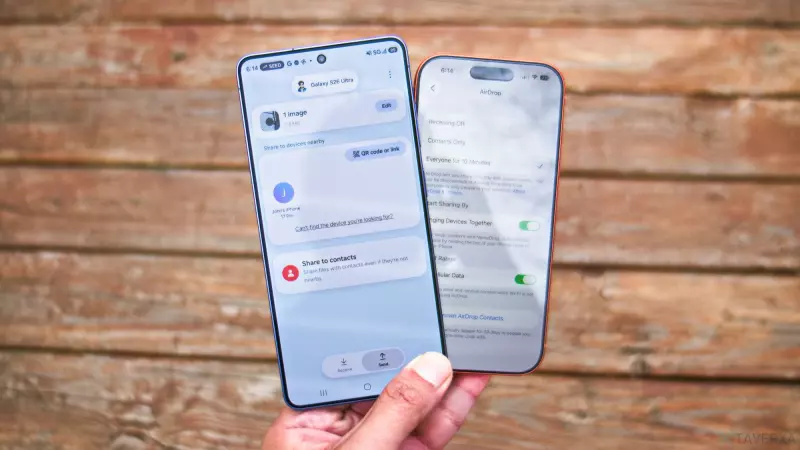
- Navigate to Settings > General > AirDrop.
- Change the setting from 'Everyone' to 'Contacts Only' or turn receiving 'Off' entirely when not in use.
For Android Users:
- Open the Quick Share settings.
- Locate the 'Who can share with you' option.
- Set this to 'Contacts' or 'Your devices' to ensure strangers cannot initiate forced connections.
Finally, the most critical piece of advice remains: keep your operating system updated. Both Apple and Google release security patches frequently, and ensuring you are on the latest version of iOS or Android is the most effective way to close these security gaps.