I Found a Free Mac App That Finally Solves the USB-C Cable Mystery
Stop guessing your USB-C cable specs. Discover how the free Mac app 'WhatCable' helps you identify data transfer speeds and power delivery for all your cables.
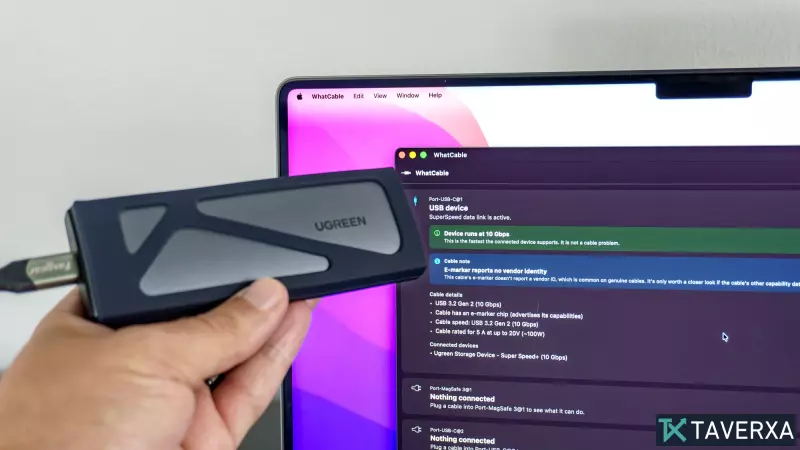
For over a decade, USB-C has been the universal standard for connectivity, yet it remains riddled with ambiguity. While we have moved past the frustration of 'plugging it in upside down,' we are now plagued by a new problem: it is virtually impossible to know the actual capabilities of a USB-C cable just by looking at it. Unlike older standards that often color-coded ports and cables to denote speed and power, modern USB-C cables often arrive without any clear markings, leaving users to guess whether a cable supports 40Gbps data transfer, 240W power delivery, or is simply a basic USB 2.0 charging wire.
The Problem with 'Blind' Cables
Most of us have amassed a drawer full of cables that came bundled with various smartphones, laptops, and tablets. Without clear labeling, distinguishing a high-speed Thunderbolt 4 cable from a basic charging cable is a guessing game. While some premium manufacturers print specifications like '10Gbps' or '5A' on the connector, these are the exception rather than the rule.
Enter 'WhatCable': A Game-Changer for Mac Users
I recently discovered a free, open-source macOS application called WhatCable that finally ends the guesswork. By leveraging the power of your Mac’s USB-C controller, the app queries the 'E-marker'—a tiny, 1mm² microchip embedded in the connector—to provide an instant, detailed breakdown of a cable’s capabilities.
How It Works
When you plug a cable into your Mac and connect a peripheral device, WhatCable identifies the hardware specs of that connection. During my testing of ten different cables, I was able to see the exact data transfer limits, power delivery standards (such as USB-PD), and even if the cable supports DisplayPort Alt Mode for external monitors.
Key takeaways from my testing:
- Technical Transparency: The app provides a 'Show technical details' feature, allowing you to see protocols like USB 3.2 and Power Delivery in real-time.
- Identifying Bottlenecks: It helps determine if a slow connection is caused by a poor cable or the device being used (such as a game controller that internally limits data bandwidth).
- Pro Features: While the app is free, a $13 pro version adds live power monitoring and a database to log your specific cables, helping you keep track of which cable belongs to which device.
Why This Matters
Cable auditing is becoming essential as our devices demand higher performance. Whether you are setting up a complex workspace with multiple 4K monitors or simply want to ensure your laptop is charging at its maximum rated speed, tools like WhatCable provide the clarity that manufacturers have failed to include on the cables themselves. I plan to use this to audit my entire collection and retire the 'mystery cables' once and for all.