Beyond the AI Hype: 5 Hidden Gems in the macOS 27 Golden Gate Public Beta
Explore the 5 best hidden features of the macOS 27 Golden Gate public beta that go beyond Siri AI, from faster AirDrop to the new Liquid Glass UI refinements.
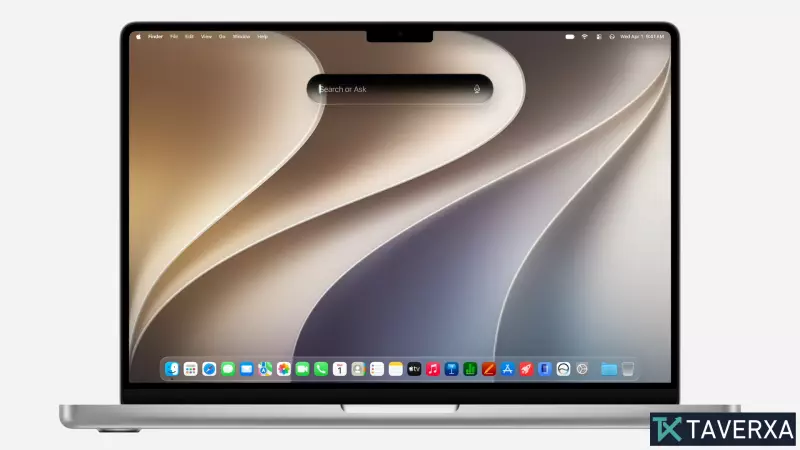
The Arrival of macOS 27 Golden Gate
Apple's latest operating system, macOS 27—codenamed 'Golden Gate'—has officially entered the public beta phase. While the headlines from WWDC were dominated by the deep integration of the new Siri AI and Apple Intelligence, a closer look at the software reveals a wealth of quality-of-life improvements and hidden features that are arguably more impactful for the daily user than the AI buzzwords.
For those who have already made the jump to the public beta, it is easy to get distracted by the glowing AI interfaces. However, the true strength of Golden Gate lies in its refinement of the user experience and a few surprising additions that may hint at Apple's future hardware roadmap.
1. Refining the 'Liquid Glass' UI
The 'Liquid Glass' design language, introduced in previous iterations, faced criticism for impacting readability and visual consistency. In macOS 27, Apple has transitioned from a rigid implementation to a more flexible system. The most significant addition is the new Liquid Glass slider, allowing users to manually adjust the transparency of glassy elements to suit their lighting environment and vision needs.
Beyond transparency, the OS now features improved uniformity across toolbars and perfectly aligned rounded corners for all app windows. When combined with the new, fluid animations for Mission Control and Spaces, the result is a desktop environment that feels significantly more polished and cohesive.
2. Turbocharged AirDrop Performance
In a move reminiscent of the legendary 'Snow Leopard' update, Apple has focused heavily on under-the-hood optimization. The most noticeable beneficiary is AirDrop. By optimizing underlying network protocols, wireless file transfers are now significantly faster.
For creative professionals using Final Cut Pro or those moving massive photo libraries between an iPhone and a MacBook Pro, this 'turboboost' reduces the friction of the Apple ecosystem. Alongside this, users will notice snappier app launch times and improved JavaScript execution, making Safari feel noticeably smoother during heavy browsing.
3. Safari: More Than Just Tab Organization
While AI-powered automatic tab organization is a welcome addition, Safari's real upgrades are found in its new utility tools. The 'Notify Me' feature is a game-changer for power users; it allows you to set specific conditions to receive a notification the moment content on a webpage changes—perfect for tracking ticket sales or price drops.
Furthermore, Apple has introduced a natural language extension builder. Using Apple Intelligence, you can simply describe the extension you want—such as a specific recipe keeper or a news feed—and Safari will generate it. Finally, the intuitive 'swipe down to refresh' gesture from iOS has officially migrated to the Mac, bringing a familiar touch of mobile ergonomics to the desktop.
4. Creative Freedom: Drawing in Messages and Notes
For the first time, the ability to draw directly into Notes, Freeform, and iMessage is available on the Mac. By utilizing the trackpad as a canvas, users can sketch ideas or send hand-drawn messages without needing an external tablet.
While this may seem like a niche addition, industry analysts suggest this expansion of drawing capabilities is a strategic move. Increasing the OS's reliance on sketching and touch-based input may be setting the stage for upcoming hardware, such as a rumored touchscreen-enabled MacBook Ultra.
5. Enhanced iPhone Mirroring and the 'Foldable' Hint
iPhone Mirroring remains one of the most productive features of the ecosystem, and Golden Gate expands its capabilities. Users can now stream DRM-protected content (like Netflix) directly to the Mac screen and access the iPhone's Control Center without touching the device.
Crucially, users can now resize the mirrored iPhone app window to be larger, forcing the app to adapt its layout. This demand for responsive, flexible app design in the mirroring tool is widely seen as a tease for the upcoming 'iPhone Ultra' foldable, which would require apps to scale dynamically between different screen sizes.
Final Thoughts
macOS 27 Golden Gate proves that Apple is still committed to the fundamentals of computing. While the AI features provide the marketing spark, it is the faster AirDrop, the refined UI, and the expanded Safari tools that will actually define the user experience. Whether you are a casual browser or a pro power-user, these five hidden features are the real stars of the show.